BlockerHero content blocker for disciplined focus and parental control
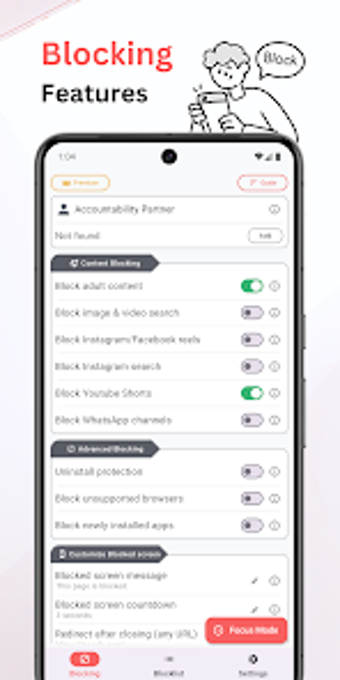
BlockerHero - Content Blocker, from Techsolvexx, is an Android app designed to reduce online distraction and block explicit material for recovery and focused work. It filters adult sites, blacklists apps and URLs, enforces Safe Search on major engines, and blocks custom keywords to remove triggering content during sessions. Features like an accountability partner, uninstall protection, and a Focus Mode aim at sustained discipline. The app suits individuals recovering from addiction, parents managing devices, and people needing strict focus windows in everyday work sessions.
What device permissions does BlockerHero rely on?
BlockerHero requires system-level access to operate across apps. The tool uses Accessibility Services together with Device Administrator permissions and requires Android 5.0 or later to function fully. Those permissions let filtering run without routing traffic through external proxies, and the developer keeps filtering logic on the device to limit external data transfer. Granting these controls reduces the chance of casual circumvention but increases setup steps compared with browser-only extensions.
How effective is filtering across mobile browsers and apps?
Filtering works beyond a single browser window. The app monitors most major mobile browsers, including Chrome, Firefox, and Opera, and it detects text inside third-party apps using accessibility triggers. Its keyword engine blocks specific text strings as well as URLs, so in-app feeds and search results can be screened. Users report consistent blocking behavior, and enforced Safe Search on major engines reduces explicit image and link results without rerouting web traffic externally.
How demanding is initial setup and ongoing tuning?
Setup asks users to enable the required services and then curate lists and keyword patterns to match personal needs. Building a precise keyword set takes iterative refinement, which suits users who want tailored restrictions rather than one-size-fits-all rules. The developer positions the app for digital well-being, so daily management centers on adjusting block lists and sensitivity until filters match the household or work environment.
How reliable is the app in real use and who praises it?
Community feedback is largely positive, with many users praising the app's effectiveness and the accountability model for sustained results. The tool's reliance on system permissions is cited as a strength for preventing quick removal, and local processing of filters is noted for privacy. Platform scope is limited to Android devices, so teams needing cross-platform parity must evaluate that constraint when choosing a solution.
Who benefits and where the trade-offs lie
BlockerHero is a practical option for users and families that accept a firm, accountability-driven approach to reducing online distractions. It rewards those willing to invest time in configuration and to follow a strict control model over the long term. Casual users seeking lightweight or cross-platform filters may find the approach heavier than necessary; the app best serves people committed to durable, device-level restraint.
Keyword-based filtering blocks explicit text across apps and browsers
Safe Search enforcement limits explicit results on major search engines
Filtering logic runs locally, reducing external browsing data transfers
Cons
Requires Accessibility Services and Device Administrator permissions
Android-only tool, compatible with devices running Android 5.0 or later
Strict protections can make ad-hoc access changes cumbersome
Accountability model needs a designated approver, which not all have
Loading…
About permissions
Before downloading, you can take a quick look at the permissions this app may request on your device. App permissions allow certain features to work properly, such as accessing your camera to take photos, your location for maps, or your storage to save files.
In this section, you’ll find a clear and simple overview of the types of permissions the app uses, grouped by their level of sensitivity, along with a visual breakdown to help you understand them at a glance. This way, you can see how the app interacts with your device and decide to download with confidence.
Permissions types
Standard
50%
Non-standard
20%
Sensitive
30%
Permissions distribution
Privacy
70%
Data collected
10%
Data shared
20%
Data safety info
Privacy
7 permissions
Permissions that allow the app to access personal or sensitive information stored on your device, such as location, contacts, camera, or microphone.
android.permission.SYSTEM_ALERT_WINDOW
Non-standard
android.permission.REQUEST_DELETE_PACKAGES
Non-standard
android.permission.USE_BIOMETRIC
Sensitive
android.permission.USE_FINGERPRINT
Sensitive
android.permission.WAKE_LOCK
Standard
android.permission.RECEIVE_BOOT_COMPLETED
Standard
android.permission.FOREGROUND_SERVICE
Standard
Data collected
1 permissions
Information the app may gather from your device or usage activity to enable features, personalize content, and improve overall performance.
android.permission.ACCESS_NETWORK_STATE
Standard
Data shared
2 permissions
Information that may be shared with trusted third parties to provide services, support app functionality, or deliver relevant content.
android.permission.INTERNET
Standard
android.permission.POST_NOTIFICATIONS
Sensitive
This report summarises the permissions declared by the app at the time of scanning and groups them into Privacy, Data collected and Data shared. A declared permission shows what the app can access, it does not necessarily mean personal data is collected or transmitted. For full details check the app’s privacy policy and the developer’s clarifications shown below. Softonic generates this report automatically from the package metadata; it is informational and not a substitute for a full security or privacy audit.
Laws concerning the use of this software vary from country to country. We do not encourage or condone the use of this program if it is in violation of these laws. Softonic may receive a referral fee if you click or buy any of the products featured here.